.svg)
Prioritising technical SEO, mobile compatibility and security fixes
A checklist for prioritising crawlability, performance and security issues, with a baseline and a test–fix–measure loop.
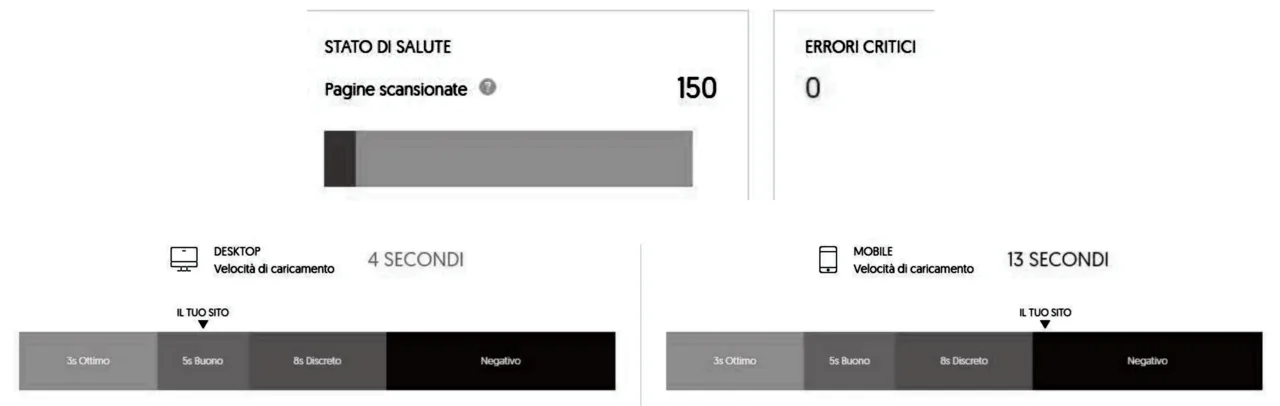


This guide brings together source-based checks for crawlability, mobile performance and security, and a process for recording findings and reviewing changes.
Contents
Crawlability and indexability: which issues stop Google from seeing pages at all
Google lists three minimum technical requirements for a page to be eligible for indexing: Googlebot must not be blocked from accessing the page, the page must return a working HTTP 200 success status, and the page must contain indexable content. [1]
If a page requires a login, Googlebot cannot crawl its protected content. [1]
Google explicitly excludes client and server error pages from indexing, so any URL that does not return an HTTP 200 (success) should be treated as not indexable until its status code is corrected and can be verified with the URL Inspection tool. [1]
After Googlebot can access a working page, Google requires the page’s textual content to be in a supported file type and not to violate spam policies in order for that content to be considered indexable. [1]
Performance and mobile compatibility quick wins and tools to prioritise for short remediation cycles
Web.dev warns that PWA features cannot substitute for fixing fundamental issues such as blocking JavaScript and oversized images, and recommends starting with an objective site audit to identify those core problems before adding extra features. [2]
An audit is valuable because it surfaces quick wins that require minimal sign‑off and creates a measurable baseline and metrics you can use to prioritise work, compare with competitors, and demonstrate improvement after changes. [2]
If nothing else, use Lighthouse checks for essential quick wins: ensure all assets are delivered over HTTPS, confirm server/CDN compression and HTTP/2, add cache‑enabling headers, move or add async/defer to script elements, remove unneeded JavaScript and libraries, and reduce image pixel sizes where possible. [2]
Complement Lighthouse with WebPageTest and PageSpeed Insights for caching, time‑to‑first‑byte and real‑world metrics, and always test as a first‑time user (incognito or with caching disabled) on representative devices and network conditions while recording subjective experience. [2]
Read Lighthouse SEO and accessibility audit scores in context
Lighthouse calculates the SEO score by treating each SEO audit as equally weighted (with Structured Data handled as an unscored manual audit), so implementing any individual SEO audit correctly will move the overall score by approximately the audit’s share (around eight points per SEO audit). [3]
Each scored Lighthouse accessibility audit uses a pass/fail result. Correcting only some affected elements does not earn partial credit for that audit; apply the requirement across the tested page. [3]
Security prioritisation: risk-based, operational and testing actions to schedule now
OWASP advises starting with a risk‑based portfolio approach: identify protection needs for each application from a business perspective, apply a consistent likelihood/impact risk rating, measure and prioritise applications and APIs, add them to your CMDB, and define assurance guidelines for required coverage. [4]
As a foundation, establish focused policies and standards that set an application security baseline, define reusable security controls for design and development, and provide a targeted security training curriculum; also integrate secure activities such as threat modelling, secure design, secure coding and penetration testing into existing processes. [4]
OWASP recommends establishing continuous application security testing: create technical and business test cases (use and abuse), manage tests to match protection needs, provide or source tools such as DAST/fuzzers, and consider formal penetration tests where higher assurance is required, while ensuring developers have time and guidance to fix findings. [4]
Operational controls to schedule include regular scanning (dynamic, static, secrets, IaC, SCA), SLAs for fixing security bugs, mechanisms for internal and customer bug reports, a trained incident response team and blocking/shielding tools, periodic hardening and penetration testing, software supply chain protection, and business continuity and disaster recovery planning. [4]
Record a baseline, fix issues and measure again
Web.dev shows you can get a usable baseline in five minutes by running Lighthouse on the homepage and saving the report data, which produces a quantified baseline and an initial todo list across performance, accessibility, security and SEO. [2]
The recommended operational loop is: record the current state before changes, run tests across multiple page types (or components/routes for single‑page apps), fix prioritized items, then retest and record results to demonstrate improvements or detect regressions. [2]
Conclusion
Start by recording the current state of your site. Use the audit findings and your security risk assessment to prioritise work, then repeat the checks after changes.
.jpg)


%20(1).jpg)
